How do I vectorize pixel art without it getting smoothed?
Updated on
Pick the Pixel art preset in the Homotope workshop: every pixel keeps its square shape, outlines stay exactly stepped, colours (up to 64) are never blended, and the SVG downloads for free.
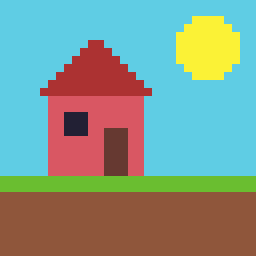 PNG · 256 × 256 px
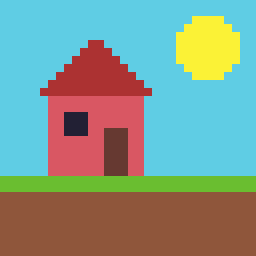 Engine SVG
Steps
- Open the workshop and drop the sprite as a PNG (or WebP).
- Pick Pixel art: no denoising, no upsampling, no smoothing, no blend band.
- Check with the slider that every pixel stayed square, then download the SVG.
Native file (32 × 32 px) or upscaled with nearest neighbour (×4, ×8): both work and give the same shapes. With “Merge by colour”, neighbouring pixels of the same colour form a single stepped path, lighter than one square per pixel. The sprite’s transparency is kept.
Nothing leaves your computer: see vectorize without uploading.
The trap: blurred pixel art
Pixel art upscaled with bilinear filtering (the default in many programs and websites) has soft edges: each border gains in-between colours, which turn into tiny stray shapes. Go back to the original file, or re-export it with nearest neighbour. Beyond 64 colours, the closest shades are grouped: keep Pixel art for limited palettes, and use Illustration for a richer image.
What it is good for
- Large-format printing: the SVG scales without blur, crisp squares included.
- Vinyl cutting: few colours, closed shapes (see a cut-ready SVG for Cricut or Silhouette).
- Embroidery: one colour per thread, prepared before digitizing (see the embroidery guide).
Production exports (DXF, EPS, PDF, separations): 2 free per month with an account, unlimited with Pro; without Pro, 1 credit each beyond those 2. The details: how much vectorizing costs.
Frequently asked questions
Why do my pixels come out rounded elsewhere?
A general-purpose tracer smooths outlines. The Pixel art preset keeps them on the pixel grid, with no curve.
Should I upscale the sprite first?
No: the native file is enough. A nearest-neighbour upscale works too; a blurry one does not.
Is the pixel art SVG free?
Yes, with no account and no limit, like the upscaled PNG export, except transparent background and recolouring (Pro).
Related questions
- How do I turn a photo of a pencil sketch into an SVG?
- How do I vectorize my signature or handwriting?
- All questions about vectorizing images
- Students: what is free
Guides and conversions
- Convert a PNG to SVG, right in your browser
- Convert a JPG to SVG, without the compression artefacts
- Vectorize a logo: from PNG or JPG to a vector file
- Convert an image to DXF for cutting
- A Vectorizer.AI alternative that never asks you to upload the image
- A clean SVG for Cricut and Silhouette Cameo, from any image
- Logo to DXF for laser cutting: from PNG to a ready file
- Turn an image into an SVG for Cricut, step by step
- Prepare a JPG for laser cutting and engraving
- Embroidery: prepare an image before digitizing
- Colour separation for screen printing, from an image